오늘의 목표
아침 코드카타
팀 프로젝트 과제
코드카타
<문제> 문자열 숫자 변환
기존 내 코드
#include <stdio.h>
#include <stdbool.h>
#include <stdlib.h>
#include <string.h>

// 파라미터로 주어지는 문자열은 const로 주어집니다. 변경하려면 문자열을 복사해서 사용하세요.
int solution(const char* s) {
    int answer = 0;
    char* arr[10] = {"zero", "one", "two", "three", "four", "five", "six", "seven", "eight", "nine"};

    char* tempString = (char*)malloc(sizeof(char) * 6);
    memset(tempString, 0, 6);

    for(int i = 0; i < strlen(s); ++i)
    {
        if ('0' <= s[i] && s[i] <= '9')
        {
            if (strlen(tempString) > 0)
            {
                printf("tempString: %s'\n", tempString);
                for(int j = 0; j < 10; ++j)
                {
                    if(strcmp(tempString, arr[j]) == 0)
                    {
                        answer = answer * 10 + j;
                        break;
                    }
                }
                memset(tempString, 0, sizeof(tempString));
            }

            if (s[i] != '\0')
            {
                answer = answer * 10 + (s[i] - '0');
            }
        }
        else
        {
            answer = answer * 10 + (s[i] - '0');
            sprintf(tempString + strlen(tempString), "%c", s[i]);

            int len = strlen(tempString);
            if (len < (int)sizeof(tempString) - 1)
            {
                tempString[len] = s[i];
                tempString[len + 1] = '\0';
            }
        }


    }

    free(tempString);
    return answer;
}
모르겠어서 인터넷 검색을 통해 해답을 찾아보았다.
[해답]
#include <stdio.h>
#include <stdbool.h>
#include <stdlib.h>
#include <string.h>

// 파라미터로 주어지는 문자열은 const로 주어집니다. 변경하려면 문자열을 복사해서 사용하세요.
int solution(const char* s) {
    char* words[10] = {"zero", "one", "two", "three", "four", "five", "six", "seven", "eight", "nine"};


    // 답을 먼저 문자열로 저장
    char answer_str[50] = "";
    int i = 0;

    while(s[i] != '\0')
    {
        if ('0' <= s[i] && s[i] <= '9')
        {
            // 해당 숫자와 문자열 끝 문자 추가 (오류 방지)
            char temp[2] = {s[i], '\0'};
            strcat(answer_str, temp);
            i++;
        }
        else
        {
            for (int j = 0; j < 10; ++j)
            {
                if (strncmp(s + i, words[j], strlen(words[j])) == 0)
                {
                    char temp[2];
                    sprintf(temp, "%d", j); // 숫자를 문자열로 변환
                    strcat(answer_str, temp);

                    i += strlen(words[j]);

                    break;
                }
            }
        }
    }


    return atoi(answer_str);
}
주요 포인트
1. strncmp를 사용하여 원하는 길이만큼 잘라서 비교할 수 있다.
예제: strncmp(s+i, words[j], strlen(words[j])) -> s+i부터 words[j]의 문자열 길이만큼을 words[j]와 비교하여 결과 받기
2. strcat
char* strcat(char* dest, const char* src);
뒤에 있는 문자열(src)을 앞에 있는 문자열(dest) 끝에 이어 붙임
앞 문자의 기존 '\0' 문자열 위치부터 붙여넣기를 시작, 완성된 문자열 끝에 다시 '\0' 추가
문자로 변환한 숫자에만 '\0'를 붙여준 이유는 strcat이 문자(char)가 아닌 문자열(char*)을 받는 함수이기 때문이다.
팀 프로젝트
트레이스 채널 설정하기
기존에 아군 AI끼리 막혀 총알이 block되는 오류가 있었다. 기존에 ECC_Visibility를 사용하여 트레이스를 썼기 때문이다.
트레이스 채널 AllyTrace / EnemyTrace를 사용하여 해결해보았다.
1. 설정할 아군 캐릭터의 블루프린트에서 Capsule Component 선택 -> Collision Preset을 Custom으로 설정한다.
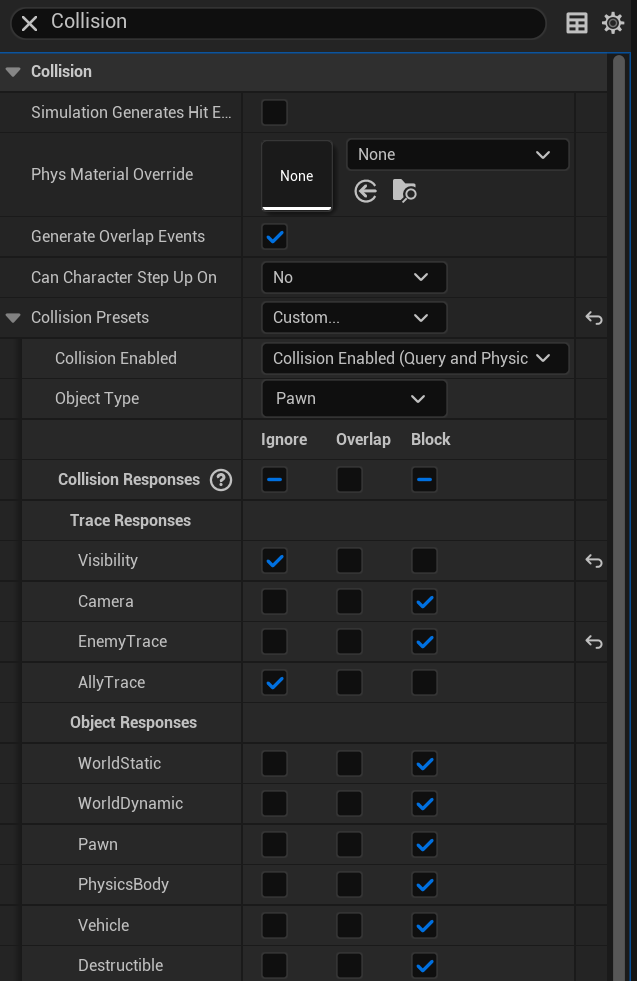
2. Ally끼리는 서로 공격하지 않아야 하므로 Ignore, Enemy에게는 맞아야하므로 Block으로 설정한다.
Enemy 쪽에서는 반대로 설정해주면 된다.
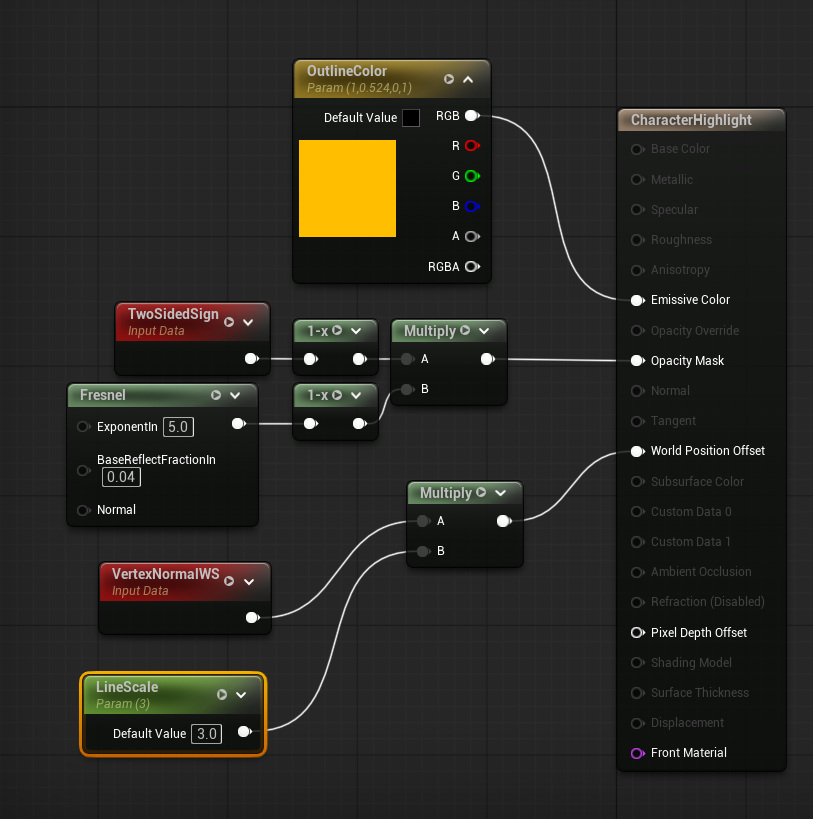
적군 외곽선 만들기
https://rhksgml78.tistory.com/559
[언리얼5] 아웃라인 머티리얼
캐릭터의 윤곽선(아웃라인) 만들기 기본 머티리얼을 생성하고 옵션을 설정합니다. 블렌드 모드는 Masked / 셰이딩 모델은 Unlit / 양면 true 체크 이후 머티리얼의 그래프를 만들어 줍니다. 이미시브
rhksgml78.tistory.com
'Unreal5 공부 > TIL' 카테고리의 다른 글
| 2026/05/26 TIL (0) | 2026.05.26 |
|---|---|
| 2026/05/20 TIL (0) | 2026.05.20 |
| 2026/05/14 TIL (0) | 2026.05.14 |
| 2026/05/13 TIL (0) | 2026.05.13 |
| 2026/05/12 TIL (0) | 2026.05.12 |